Packaging Barcode Verification Systems

Do you need to read the code, check that it matches the item scheduled for this run, or measure print quality? Choose the check your line needs.

Show Comwin the code on its packaging and the result you need from the check.

    Code labels on the flat face of a carton and on a glossy flexible pouch
    The flat carton and glossy pouch present different viewing conditions. Code placement illustration.

    Choose the result you need from the scan

    Start with the symbol type, the pack surface and the action expected for unreadable or incorrect packs.

    What you need to packFinished resultEquipment to assessWhat changes the choice
    A code needed for data captureDecoded value linked to the packFixed industrial barcode readerCode size, surface, placement and speed
    A readable code may carry the wrong valueDecoded value compared with the expected item or lotReader plus job data comparison and pack trackingReference data and physical result on failure
    A specified symbol-quality requirementGrade with a repeatable method and reportCalibrated verification equipmentRequired method, sample frequency and inline needs

    Read the barcode on a moving pack

    For a readable linear or 2D symbol that needs to be captured at the required line rate.

    1. Present code face
    2. Trigger image capture
    3. Decode symbol
    4. Send value or no-read

    A fixed industrial barcode reader can decode a symbol as the pack moves past. Work out where the code is visible, the working distance and how much it moves between packs. Adjust handling or lighting if glare or orientation makes the face hard to read.

    Run real pouches and cartons at production speed. Include the smallest code and the pack face most prone to glare or movement.
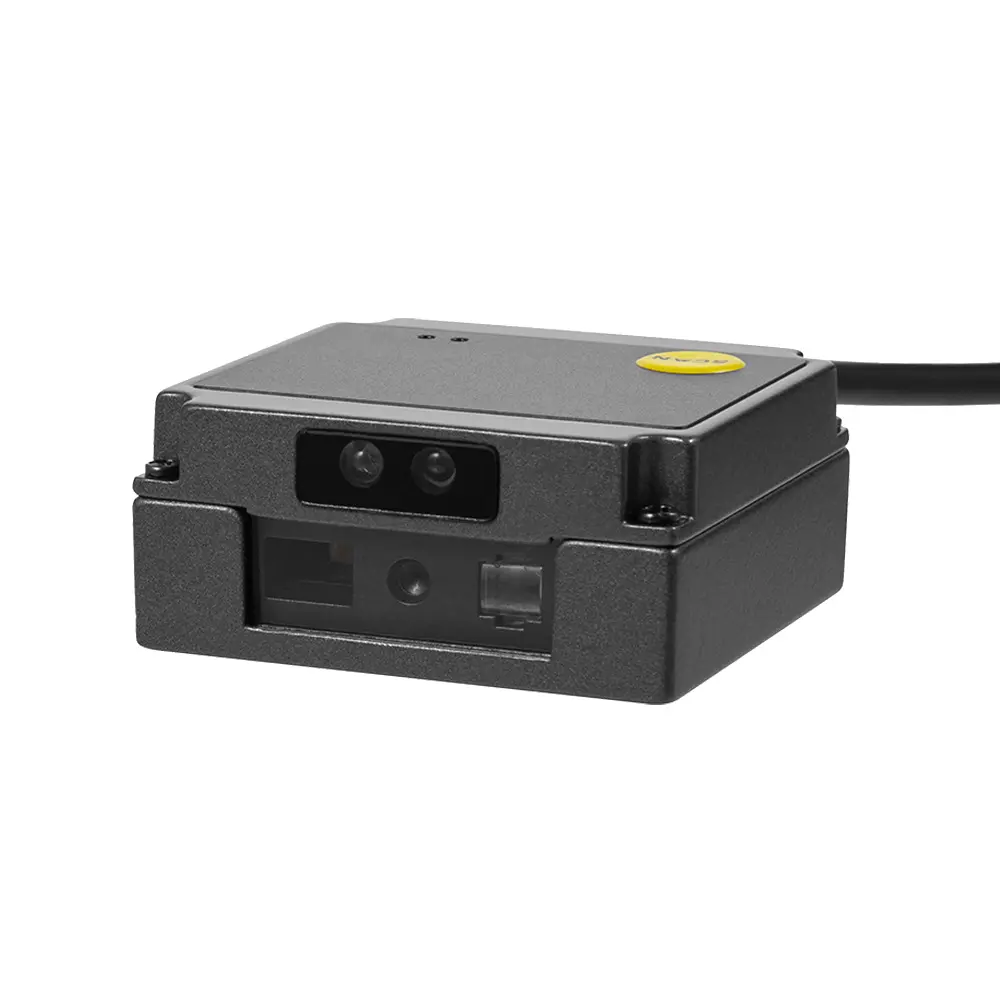
    Compact fixed barcode reader enclosure with optical windows
    Fixed reader hardware for capturing a code. The working distance, light and trigger follow your pack and conveyor.

    Match the decoded data to the production job

    For a production run that needs each decoded code checked against the expected item or lot.

    1. Read code
    2. Compare to active job
    3. Track matched pack
    4. Release or reject

    Compare the decoded value with the item or lot selected in the machine recipe or passed from your production system. For example, if the job calls for A-104 and the label reads A-140, flag the mismatch and track that pack to the selected hold or reject point.

    If the pack label must be matched to the actual item, read a separate identifier on the item, for example before it is covered, and compare it with the pack label. After a job change or restart, test the first packs against the newly selected reference.

    Expected for this job
    ITEM A-104
    Value read from the label
    ITEM A-140
    Read result
    Decoded successfully
    Job comparison
    Mismatch. Hold the affected pack.
    Example using sample item IDs. The scanner reads A-140. The active job expects A-104, so the system flags a mismatch.

    Grade barcode print quality

    For customer acceptance that specifies an objective barcode print-quality grade.

    1. Confirm symbol and test method
    2. Set the calibrated verifier
    3. Grade sample or defined inline output
    4. Record the result

    Agree the symbol, the grading method and the minimum grade with the party that will accept the report. For printed 2D labels, ISO/IEC 15415 is one method to specify where applicable. If grading must take place inline, confirm the setup with the actual label and line conditions.

    Routine decode and match may be enough for wrong-label control. Add print grading when the contract asks for it or when a repeatable quality measurement is needed.

    Sample
    Printed Data Matrix label, reference sample
    Method
    ISO/IEC 15415 if specified for the application
    Setup to record
    Verifier and calibration reference, lighting and aperture
    Quality measurements
    Overall grade and individual results such as symbol contrast and modulation
    Decision
    Compare the measured grade with the agreed minimum
    Illustrative verification report fields. The measured values come from your label trial.

    Catch code mismatches before dispatch

    Use real codes from a changeover to check the comparison and the response. Include a readable code with the wrong value as well as one the reader cannot decode.

    Give the code a stable view
    Use the flattest available surface and reserve a clear area around the symbol. Test on production material when light reflects or print lands over a crinkle.
    Challenge the controls during a job change
    Use correctly labeled, wrong-code, duplicate and unreadable samples as applicable. Confirm which pack is removed or held and how the record maps to it.
    Check the print separately where needed
    A grade can flag marginal print while a decoder still reads it. Use the agreed verifier and record settings so repeat checks are comparable.

    Join the reader to the right line controls

    Plan the trigger and the distance to the control action. The pack must keep its identity between the reading point and the reject or hold point.

    Production setupWhat operators doChangeover and interfacesWhat to prove in a run
    Read or log onlyAttend the line and respond to unreadable codes as agreed.Set the code location, trigger and data destination.Show reliable reads and correct records by orientation.
    Read, match and rejectReplenish labels or clear rejects as assigned.Agree job data, pack tracking and reject confirmation.Run wrong, missing and unreadable codes through the actual response.
    Formal print-grade checkCollect and present reference samples, or monitor the qualified inline setup.Use the agreed settings, calibration check and report.Repeat the specified tests and retain the resulting grades.

    Compare barcode station proposals

    Compare the same pack, symbol data and failure action. A reader, a line-control project and a graded verification station have different supply scopes.

    CompareWhat to agree with ComwinWhat to match in other offers
    Supply scopeList the reader and lighting, job comparison and rejection controls, and a calibrated verifier if the application requires a grade.Check the inclusion of a calibrated verifier only if grading is required.
    OutputSet the actual line rate and code orientation.Compare reads and decision timing on the same sample set.
    Change formatsList symbols, print locations and working distances.Check change of software jobs, optics and triggers.
    SupportAssign setup, acceptance and interface support.Confirm who handles changed label data and backups.
    DeliveryDefine the line mounting, power, network and test labels.Ask for a decoded-data log, a mismatch action record or a print-quality report sample, according to the checks specified.

    Barcode system questions

    Is an inline barcode reader a print-quality verifier?

    A reader decodes the data. Print-quality grading requires a suitable verifier and an agreed method. Decide whether you need read confirmation, comparison with job data, a grade, or more than one of these.

    Where should a barcode check sit after the printer?

    Use a stable pack position and leave time for the printed mark to be readable. See packaging coding machines if the mark still needs to be specified.

    Send the samples for the check you need

    If a reader is going on a moving line, include the usual pack rate. For print grading, attach your customer’s specification if one is available.

    Read or log a code

    Send first
    Send a real labeled pack, a photo showing where the code sits, and an example of the data you need to capture.
    What Comwin checks
    Reader position, lighting and trigger, plus where to send the decoded value.

    Compare codes with the active job

    Send first
    Send one correct code and one sample mismatch. Include the expected item or lot, where the line gets that value, and whether it should log, hold or reject a mismatch.
    What Comwin checks
    How to use the reference value and track what happens to a mismatched pack. If the actual item needs its own check, show us a separate identifier available on it.

    Get a print-quality grade

    Send first
    Send labels printed on the actual packaging material, along with the required symbol type and grade or the specification you were given.
    What Comwin checks
    Test conditions and the report you need, with an assessment of inline grading or sampled checks.